
Let's be honest—tackling that bird's nest of wires behind your desk or TV can feel like a chore you’ll get to… eventually. But what if I told you it’s more than just a cosmetic fix? Getting those cords under control is one of the smartest, simplest upgrades you can make for your home or office. It’s not just about looking good; it's about creating a space that’s safer, more efficient, and a lot less stressful.
The best solutions are often the simplest. Think cable raceways for walls, sleek under-desk trays for your workspace, and handy cable boxes to hide away those bulky power strips. These tools don't just hide the mess—they transform visual chaos into a clean, organized, and much safer environment.
Why Bother With Cable Management?
A tangled mess of cords isn’t just an eyesore; it's a genuine safety risk. We've all tripped over a loose cable before. For households with kids or elderly family members, those stray wires are a serious trip hazard waiting to happen. And let's not forget our furry friends, who often find a bundle of exposed wires an irresistible chew toy, creating a risk of electrical shock and damaged gear.
Protect Your Tech (And Your Sanity)
Beyond the immediate safety concerns, think about the lifespan of your expensive electronics. When cords are twisted, pulled, and strained, the delicate internal wiring eventually gives out. That constant stress right at the connection point—like where your charger plugs into your laptop—is one of the top reasons they fail prematurely. By neatly routing your cables, you prevent all that wear and tear, helping your devices last much longer.
There’s a mental benefit, too. Visual clutter is a known productivity killer. Studies have consistently shown that a disorganized environment can ramp up stress and shatter your focus. In a work-from-home world, a clean, wire-free desk isn't a luxury; it's a necessity for a productive day.
Taking a few minutes to manage your cables isn't just about tidying up. You're making a real investment in the safety of your home, the longevity of your electronics, and your own peace of mind.
Ultimately, you want your technology to serve you without adding to the visual noise. Good cord management makes your devices feel seamlessly integrated into your space. The benefits are crystal clear:
- Better Safety: No more trip hazards for the family or tempting chew toys for pets.
- Longer-Lasting Gear: Reduces physical strain on cables and ports, extending the life of your gadgets.
- Sharper Focus: A decluttered, distraction-free space helps you relax and get more done.
Choosing the Right Cord Hiding Solution
Picking the perfect cord management tool isn’t about finding a single magic bullet. It’s more about matching the right solution to the right problem. What works wonders for a sleek, wall-mounted TV might be totally impractical for a busy home office desk.
Thinking through your needs first saves you from buying a bunch of gear you’ll never use. Are you trying to hide a single lamp cord running along the baseboard, or are you trying to finally defeat that monster under your desk made of a power strip and a dozen chargers? Each job calls for a different hero.
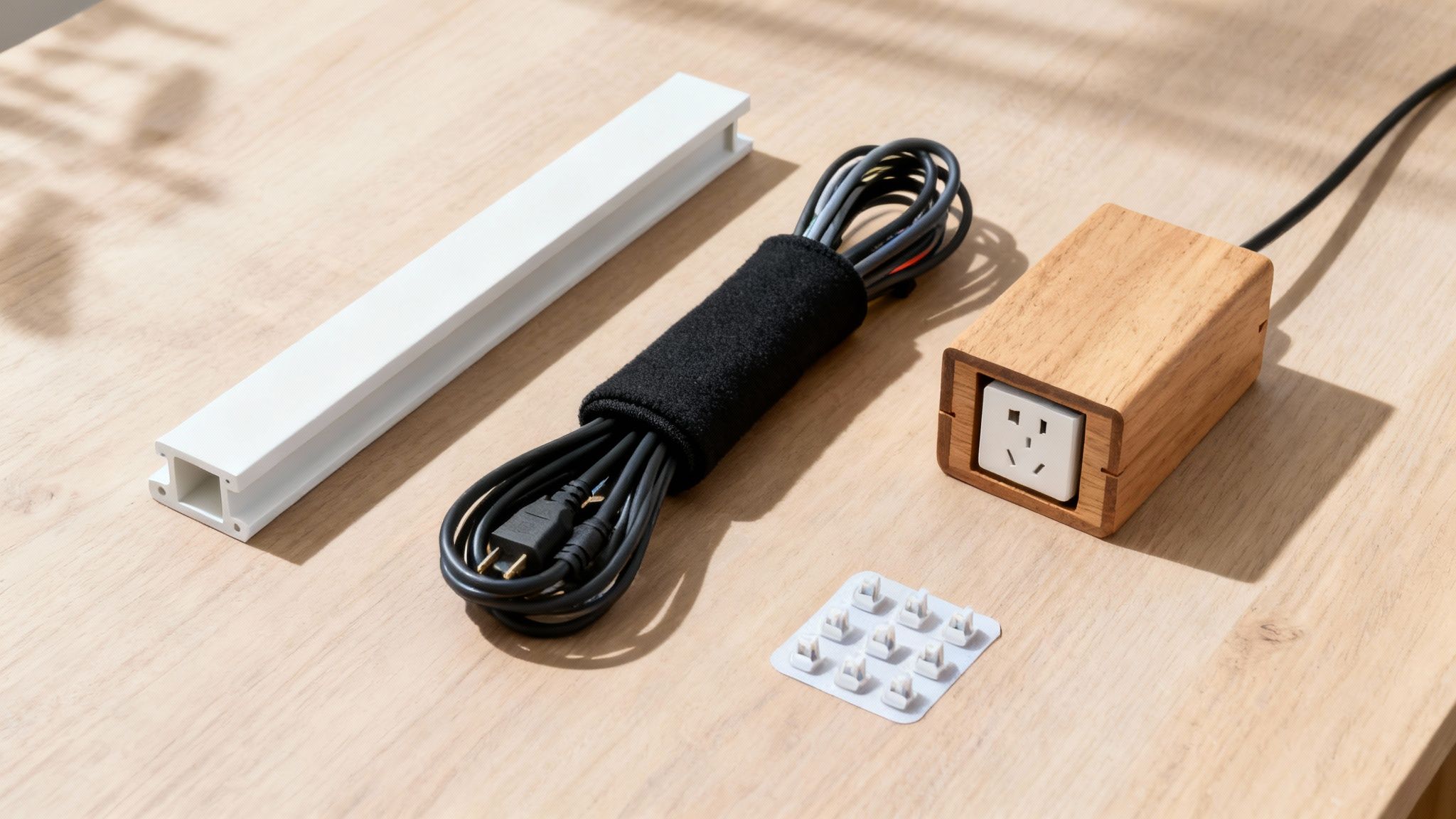
Figure Out Your Cable Situation
Before you click "buy" on anything, take a minute to really look at the mess you're trying to solve. Ask yourself a few key questions:
- Where are the cords? Are they running down a wall, dangling under your desk, or snaking behind an entertainment center?
- How many cords are there? Is it just one or two thin cables, or a thick bundle of eight?
- Do they need to move? Will you need to add or remove cables often, or can you set it up once and forget about it?
- How visible is the area? Does the solution need to be practically invisible, or is it hidden away anyway?
Answering these questions will point you in the right direction. For instance, that one ugly wire trailing down from your wall art is a perfect job for a slim, paintable cord raceway. You just stick it on the wall, paint it to match, and it practically vanishes.
But that nest of wires and bulky power adapters under your desk? That's a classic case for a cable management box or a sturdy under-desk tray. These are designed to swallow the bulk, getting everything up off the floor and completely out of sight.
Comparing Popular Cord Hiding Methods
With so many options out there, it can be tough to decide what to get. This quick comparison breaks down the most common cable management solutions to help you choose the right one for your specific needs, whether you're hiding a single charger or organizing a full entertainment system.
| Solution Type | Best For | Pros | Cons |
|---|---|---|---|
| Cable Raceways | Hiding cords on walls or baseboards from TVs, speakers, or lamps. | Clean, permanent look; often paintable to match decor. | Not great for frequent cable changes; requires a flat surface. |
| Cable Sleeves | Bundling multiple cords together, like from a PC to a monitor. | Flexible, easy to add/remove cables, good for sit-stand desks. | Doesn't completely hide the bundle, just organizes it. |
| Cable Boxes | Containing power strips and bulky adapters on the floor or desk. | Hides the messiest part of your setup; simple to use. | Can be bulky; needs good ventilation for heat. |
| Cable Clips | Guiding single cables along desk edges or walls. | Small, discreet, and repositionable; great for chargers. | Not suitable for hiding multiple or thick cables. |
| Under-Desk Trays | Mounting power strips and cables underneath a desk surface. | Gets everything off the floor; creates a floating, clean look. | Requires drilling into the desk; can be tricky to install. |
Ultimately, the best setups often use a mix of these tools. Don't be afraid to combine a raceway on the wall with a sleeve behind your desk and a box for the power strip to achieve a truly professional result.
Popular Cord Hiding Tools and When to Use Them
Let's dig a little deeper into the most common solutions and where they really shine.
Cable Raceways (Cord Covers)
These are the clean, rigid channels that stick right onto your walls or baseboards. They are the absolute go-to for hiding wires from wall-mounted TVs, surround sound speakers, or anything running vertically up a wall.
- Best For: Long, straight cable runs on any flat surface.
- Pro Tip: Always choose a paintable raceway. A quick coat of paint to match your wall color makes it look like a custom, built-in feature. Our guide to using a TV cord hider has more specific tips for this.
Cable Sleeves
Think of these as a stylish, flexible jacket for your wires. They're typically made of a woven fabric that wraps around a whole bundle of cords, turning a tangled mess into a single, neat tube.
- Best For: Grouping cables that run from a computer to its monitors or from a cluster of devices down to a power strip.
- Pro Tip: Their flexibility is a lifesaver for sit-stand desks, allowing the cables to move up and down with the desk without snagging or pulling.
A common mistake is trying to make one tool do everything. A truly clean setup often uses a combination of solutions: a raceway on the wall, a sleeve behind the desk, and a box for the power strip.
Cable Management Boxes
These are beautifully simple. A cable management box is just a container designed to house an entire power strip, along with all those clunky plugs and extra-long cords. You drop the power strip inside, plug everything in, and pop the lid on.
- Best For: Hiding the chaos of power strips and adapter bricks on the floor or on top of a desk.
- Pro Tip: Look for boxes with plenty of ventilation slots. Power adapters can get warm, and good airflow is important to keep things cool and safe.
This variety of tools is part of a huge industry focused on keeping things tidy. In fact, professional-grade solutions like cable trays and conduits are so popular that they hold 35.12% of the cable management market share, proving that both businesses and homeowners are serious about organization.
Achieving a Clutter-Free Desk Setup
Your desk is your command center. It’s where you work, create, and connect. But let's be honest—it can quickly become ground zero for cable chaos. Monitor cables, keyboard wires, and a tangled nest of chargers don't just look messy; they create a stressful environment that kills productivity. The good news? Reclaiming your desk is easier than you think.
The goal here isn't just about hiding the mess. It's about creating a functional, organized system. The most effective approach I've found starts by getting everything off the floor. A bulky power strip sitting in a pile of dust is not only an eyesore but a magnet for tangled wires.
Mount Your Power Strip Under the Desk
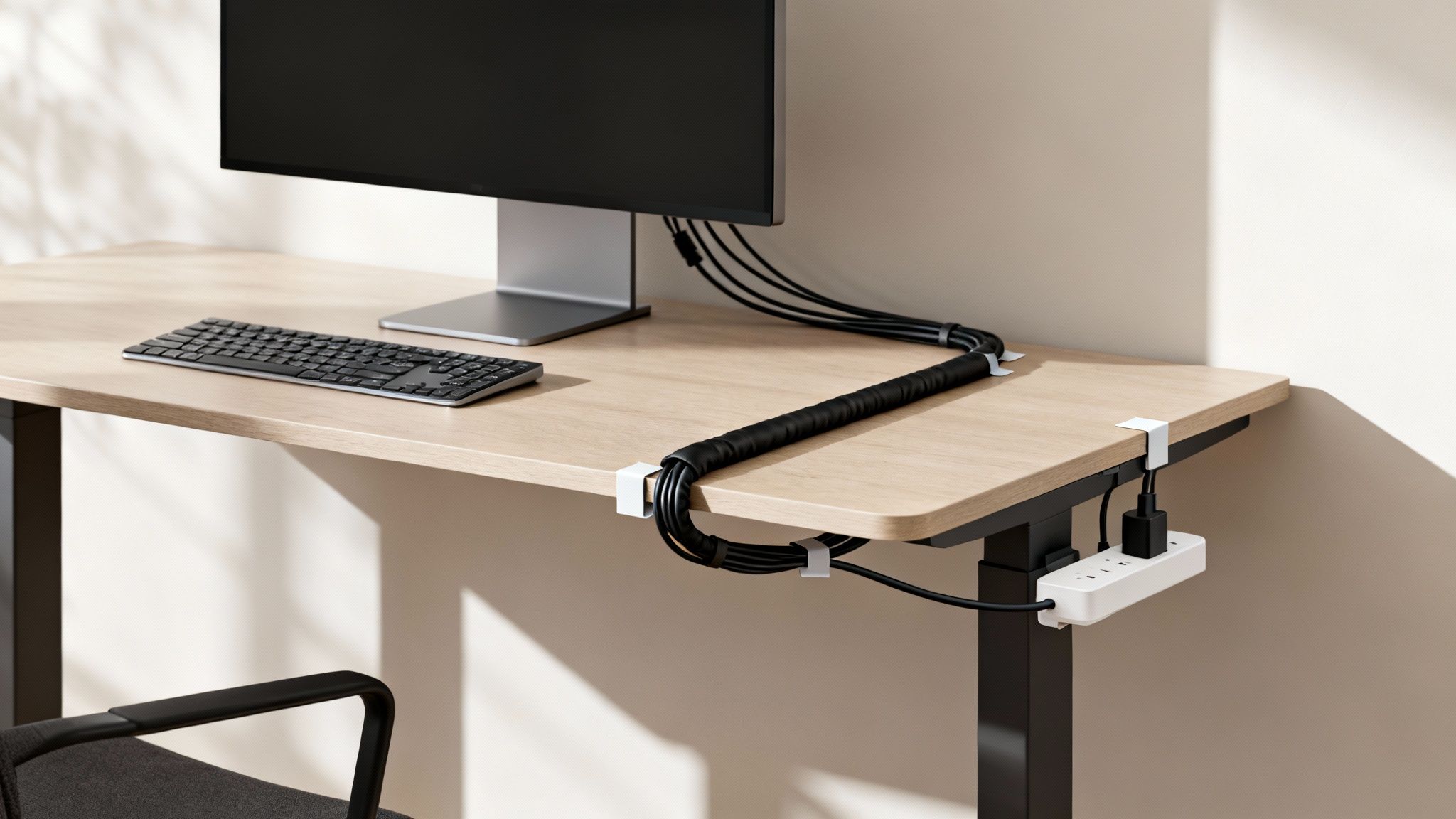
If you do only one thing, make it this: mount your power strip to the underside of your desk. This simple move instantly elevates your entire setup. It clears the floor and creates a central, hidden hub for all your connections. You can use strong double-sided tape, Velcro strips, or even better, a dedicated under-desk tray.
By moving the power source off the floor and directly under the worksurface, you shorten the distance your cables need to travel. This immediately reduces visible slack and makes every other step of the process much simpler.
Once your power strip is secured, you can start plugging in your monitor, computer, and other permanent devices. This strategy is a core component of a clean workspace, and our guide on under-desk cable management dives even deeper into techniques for achieving this seamless look.
Bundle and Route Your Cables
With your power source in place, it's time to group related cables together. The wires running from your monitor, keyboard, and mouse can all be bundled into a single, clean line using a flexible cable sleeve. These neoprene or fabric tubes work wonders, turning a multi-cable mess into one organized conduit.
For individual wires you need access to, like a phone charger, adhesive cable clips are your best friend. Just stick them along the back edge or leg of your desk to guide the cable exactly where you want it. This keeps essential chargers within easy reach without letting them clutter your workspace.
- Cable Sleeves: Ideal for grouping multiple static cables (like your monitor and PC power cords) into one neat package.
- Adhesive Clips: Perfect for guiding single, frequently used cables (think charging cords) along desk edges so they don't wander.
- Velcro Ties: Great for managing any excess cable length by bundling it into a tidy coil right under the desk.
The demand for these kinds of organizational tools is booming. The global cable management system market was valued at USD 23.5 billion and is projected to climb to USD 37.6 billion by 2030. You can see the full trend analysis over on Grand View Research. This isn't just a niche trend; it shows a broader understanding that a tidy desk isn't just about aesthetics—it’s about creating a better environment for focus and productivity.
How to Hide TV Wires for a Seamless Look
A wall-mounted TV is supposed to look clean, almost like it's floating. But that sleek illusion is instantly shattered by a dangling mess of HDMI and power cords. It's a common problem that can completely undermine the modern, minimalist vibe you were going for.
Fortunately, getting that professional, wire-free look is a pretty straightforward project, and it makes a huge impact on your living space. The goal is to make the technology feel like a part of the room, not just something stuck on the wall. This means tackling every single cable—from the TV's power cord to the wires connecting your soundbar, gaming console, and streaming sticks.
Use a Paintable Cord Raceway
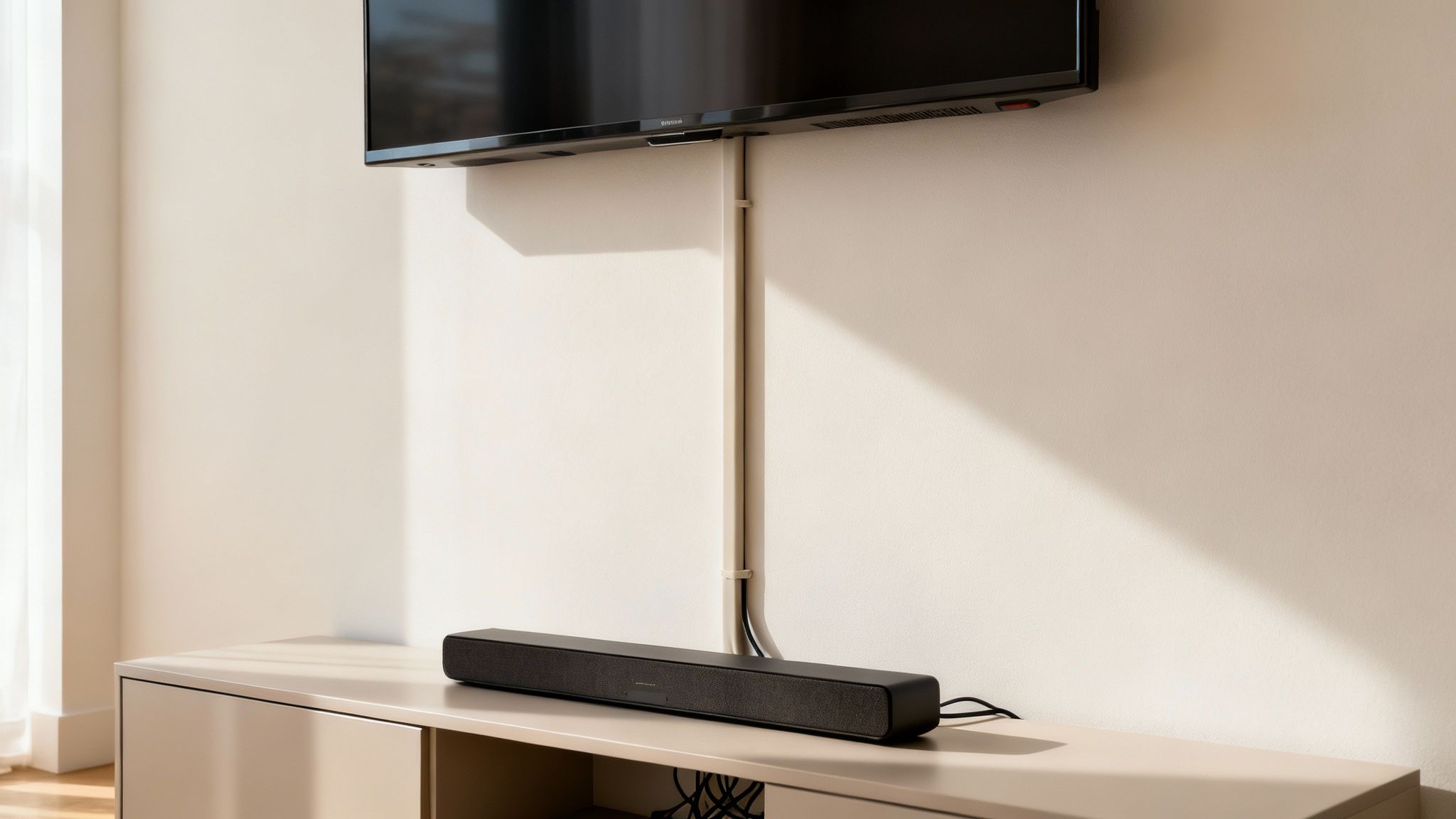
For an incredibly effective and beginner-friendly fix, a surface-mounted cord raceway is your best friend. These are just slim plastic channels that stick right onto your wall, creating a clean path to hide the wires running from your TV down to an outlet or media console.
The installation is dead simple:
- Measure the distance from the bottom of your TV to where the wires need to end up.
- Cut the raceway to length with a small handsaw (or even heavy-duty scissors).
- Peel off the adhesive backing and press it firmly onto the wall.
- Tuck your cables inside and snap the cover shut.
The real trick to making a raceway blend in? Paint. When you paint the channel the exact same color as your wall, it becomes nearly invisible. It starts to look less like a cord cover and more like a subtle piece of architectural trim.
This method is perfect if you want to avoid cutting into your drywall. It’s a great solution for renters or anyone looking for a quick, damage-free fix. For a complete walkthrough, check out our guide on using a TV cable cord cover.
Install an In-Wall Cable Hiding Kit
If you're comfortable with a small DIY project and want the absolute cleanest look possible, an in-wall cable management kit is the ultimate solution. These kits let you route low-voltage cables (like HDMI and audio) directly through the wall, completely erasing any sign of them.
The process usually involves cutting two small holes in your drywall—one behind the TV and another down near your outlet. You then fish the cables through the wall using the grommets and tools provided in the kit. It takes a bit more effort, but the result is that truly professional, "floating TV" look that’s impossible to beat.
Just one critical safety note: never run your TV's main power cord inside the wall. This is against electrical safety codes. These kits are specifically designed for low-voltage wiring only.
Organizing Cords in Your Car and On the Go
Cable chaos doesn’t just live at home or in the office—it follows you into your car and travel bag, too. But the same simple strategies that create a clean workspace can bring that same sense of order to your life on the move. Taming those stray wires is one of the best ways to hide cords and finally declutter your mobile life.
A phone charger or dashcam wire dangling across your dashboard isn't just an eyesore; it's a distraction and can even become a safety hazard if it gets tangled. Thankfully, the fix is usually much simpler than you'd think.
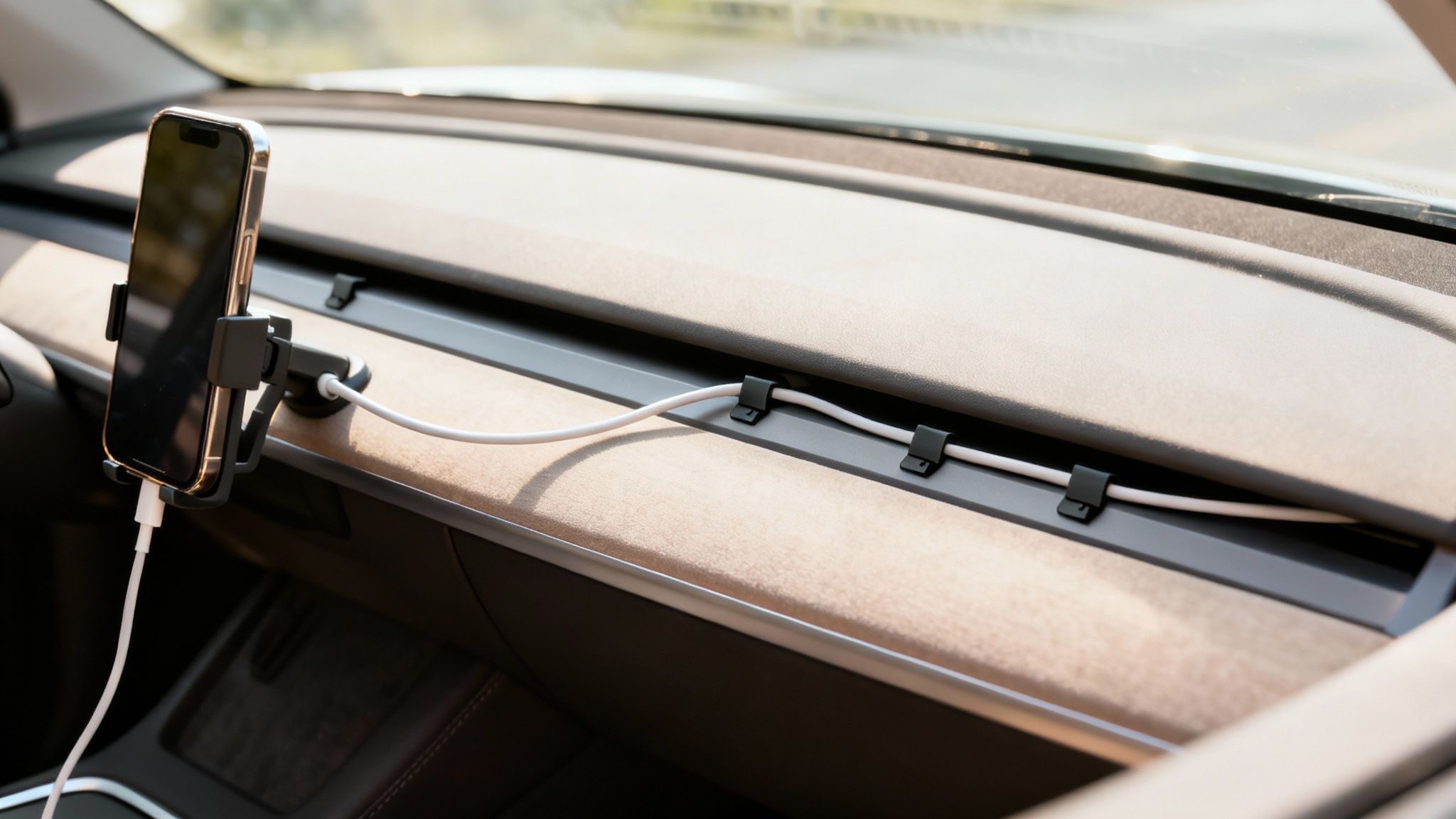
Streamlining Your Vehicle's Wires
The real goal for in-car cable management is to make the wires practically disappear. You can get a nearly invisible setup for dashcams and charging cables just by tucking them into the seams of your car's interior. Start right at the device and gently push the wire into the gap between your windshield and the headliner.
From there, you can trace the cable along the A-pillar (that's the post between the windshield and the front door) and run it down into the dashboard's side panel. A few small, clear adhesive clips are perfect for securing the wire discreetly under the glove box, guiding it straight to the power source. This whole process keeps the cord completely out of your line of sight.
A clean car interior just feels more spacious and less chaotic. By routing wires along existing trim lines, you're using the car's own design to hide the clutter. The result is a professional-looking installation that only takes a few minutes to complete.
Mastering Travel Cord Management
When you're actually traveling, keeping track of chargers, adapters, and earbuds can feel like a nightmare. This is where a dedicated travel organizer saves the day, preventing you from pulling a tangled knot of electronics out of your bag when you arrive.
A simple cable organizer pouch is a total game-changer. These usually have dedicated elastic loops and pockets that hold every single item securely in its place.
- Cable Ties: Grab some reusable Velcro or silicone ties to wrap up individual cords before you pack them. This stops them from unraveling and tangling with everything else.
- Designated Pockets: Use the larger zippered compartments for bulky power bricks, keeping them separate from delicate earbuds or small USB drives.
- Compact Power Strip: A small, travel-sized power strip can be an absolute lifesaver in hotel rooms with not-enough outlets, keeping all your charging needs in one tidy spot.
The growing demand for these kinds of specialized tools shows just how useful they are. The global market for cable management accessories was valued at USD 3.10 billion and is projected to grow significantly. You can dig into the full market projections over at Precedence Research. It just goes to show that a commitment to organization goes far beyond the home office.
Common Cord Hiding Questions Answered
Even with the best tools in hand, questions always pop up when you're in the middle of a cable management project. It’s totally normal to wonder about the little details, from installation quirks to safety concerns.
We've pulled together some of the most common questions we hear to give you quick, clear answers. Think of this as your go-to guide for getting past those final hurdles and finishing your project with confidence. Getting these details right is what separates a good setup from a great one.
Are Cable Raceways Difficult to Install on Walls?
Not at all! Honestly, most modern cable raceways are designed for easy, DIY installation. The majority come with a strong self-adhesive backing, so for most smooth walls, you just peel and stick. The whole process often takes less than five minutes per strip.
For a more permanent hold, especially if you have textured walls or a heavier bundle of cables, using the included screws is a smart move. The covers are made to snap on and off easily, which is a lifesaver when you need to add or remove a cable down the road. You definitely don’t need to be a DIY pro to get a clean, professional look.
A common worry is whether the adhesive will damage the paint. While the adhesive is strong, you can usually remove it with a little care. Gently heating it with a hairdryer can soften the glue, making it much easier to peel off without taking the paint with it.
What Is the Best Way to Hide a Bulky Power Strip?
The single best thing you can do is get that power strip off the floor. An under-desk cable management tray is a fantastic solution. It screws to the bottom of your desk and creates a hidden shelf for the power strip and all those clunky power bricks. This keeps everything contained and makes cleaning your floor so much easier.
Another great option is a dedicated cable management box. These boxes sit on the floor or your desk but neatly tuck away the entire power strip and all the extra cord length inside. Either way, you'll dramatically cut down on the visual chaos that power strips are famous for.
How Can I Hide Cords Without Damaging Walls or Furniture?
If you're looking for a completely damage-free approach, you'll want to focus on non-permanent solutions that don’t need screws or aggressive adhesives.
- Adhesive Cable Clips: These are perfect for routing wires along the back of a desk or entertainment center. They hold on tight but can usually be removed without leaving any gunk behind.
- Braided Cable Sleeves: An excellent choice for bundling a bunch of cords into a single, tidy tube without using any adhesive at all.
- Velcro Ties: Simple, reusable, and perfect for coiling up excess cord length behind your furniture or inside a cabinet.
If you're renting, high-quality, adhesive-backed raceways can still be a solid choice. Just be sure to check the product’s removal instructions—some are specifically designed to come off with minimal impact.
Is It Safe to Put All My Cords into One Sleeve or Box?
Generally, yes. It's safe to bundle low-voltage cables (like HDMI, USB, and Ethernet) with standard power cords inside a raceway, sleeve, or box. These products are designed for exactly this kind of home and office use.
However, a couple of safety rules are worth remembering. Try to avoid coiling power cords too tightly, as this can sometimes generate heat. Also, and this is critical, never run extension cords or power strips inside your walls. This is a major fire hazard and violates electrical codes. Just make sure your raceway or box has a little room for air to circulate and that you aren't plugging more into your power strip than it's rated for.
Ready to conquer the cord chaos for good? At EVEO, we create simple, effective solutions to help you organize your space. Our cable raceways and cord hider kits are designed for easy installation and a clean, professional finish. Explore our collection and find the perfect tools to create a safer, more organized home and office.
The Best Way to Hide Cables for a Clean and Safe Space
How to Clean Computer Screens Without Causing Damage