
The best way to hide cables isn't some secret trick. It's really just a simple, three-part strategy: first you bundle the wires together, then you route them along discreet paths, and finally, you conceal them using tools like raceways or boxes.
This approach is what transforms those tangled messes into clean, organized setups, whether you're tackling the rat's nest at your desk or the chaos behind your entertainment center.
Why Bother Hiding Cables?
Let's be honest, staring at a tangled web of wires is more than just an eyesore. It's a source of low-key, daily frustration that makes a space feel chaotic and unfinished. Good cable management is the secret to creating a calm, functional environment. It's not about a single magic bullet, but a thoughtful approach to organizing the electronics that power our lives.
The core principle is surprisingly straightforward. When you group related cords, guide them along the natural lines of your furniture or walls, and use the right tools to hide them from view, you can achieve a result that looks genuinely professional. This process doesn't just eliminate visual clutter—it also makes it easier to clean, troubleshoot connections, and prevent someone from accidentally yanking a plug out.
This diagram breaks down that foundational three-step process for hiding your cables the right way.
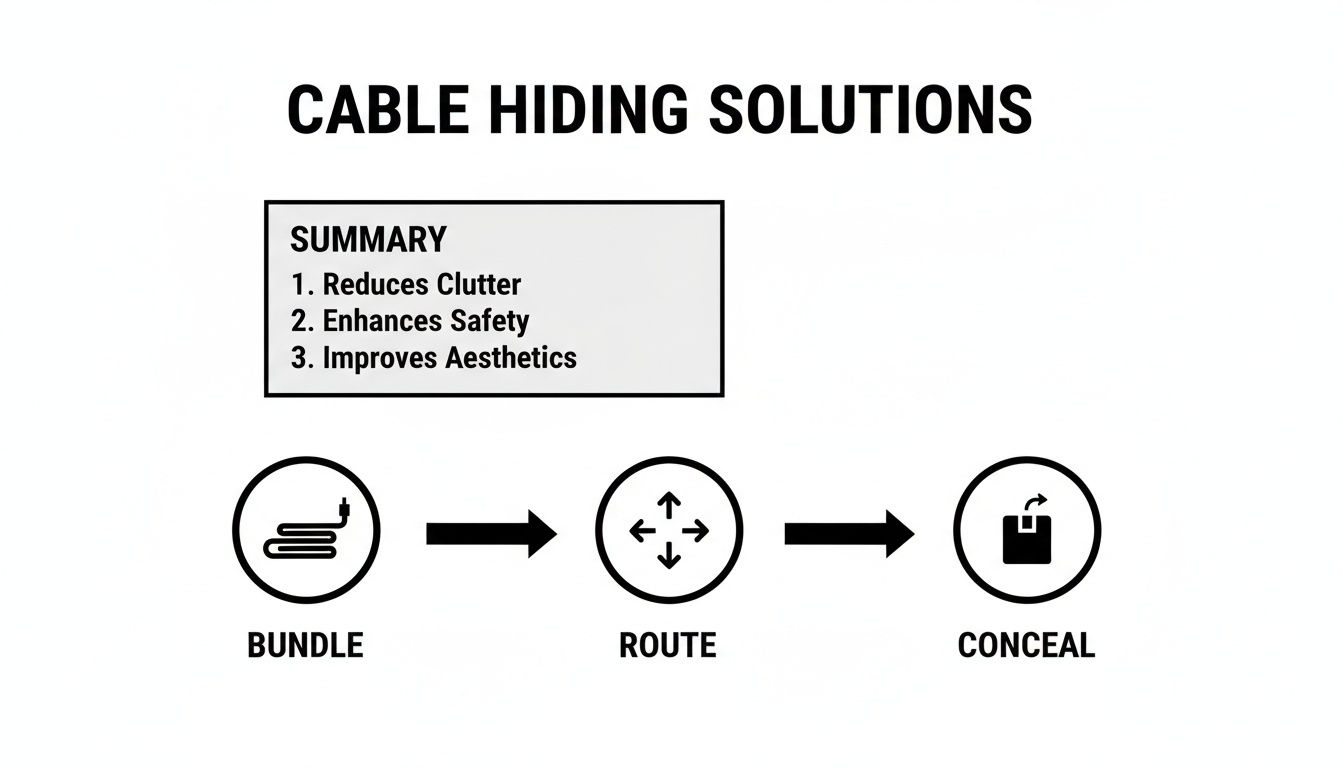
As you can see, mastering cable management is all about following a logical flow. Starting with bundling and ending with concealment is the key to getting that truly clean finish.
The Real-World Benefits of Hiding Your Cables
Beyond just making things look neat, taking the time to organize your cables brings several practical advantages that improve both your space and your peace of mind. After all, a clutter-free setup is a productive setup.
A few key benefits you'll notice right away:
- A Safer Space: You immediately eliminate tripping hazards. This is especially important in homes with kids or pets who might be tempted to play with or chew on exposed wires.
- Longer-Lasting Cords: It protects your cables from getting chewed up by pets, snagged by vacuum cleaners, or crushed by office chairs rolling over them. This simple step can seriously extend their lifespan.
- Better Airflow for Electronics: A jumble of wires behind your PC or TV can trap heat and block ventilation. Keeping them organized allows air to circulate freely, preventing your gear from overheating.
A well-managed cable system isn't just a design choice; it's a practical investment in the safety, efficiency, and longevity of your electronic devices.
Cable Hiding Solutions at a Glance
With so many options out there, it helps to see how they stack up. Here’s a quick comparison of the most common cable management tools to help you pick the right one for your project.
| Solution | Best For | Effort Level | Permanence |
|---|---|---|---|
| Cable Sleeves | Bundling cables behind desks or TVs | Low | Non-permanent |
| Cable Clips | Routing individual cords along edges | Low | Semi-permanent |
| Under-Desk Trays | Hiding power strips and adapters | Medium | Semi-permanent |
| Cable Boxes | Concealing surge protectors on the floor | Low | Non-permanent |
| Wall Raceways | Hiding cords running up a wall to a TV | Medium | Permanent |
| In-Wall Hiding Kits | A completely invisible, pro-level finish | High | Permanent |
Ultimately, the best way to hide your cables is the one that fits your specific needs. It might be as simple as an EVEO Cable Management Sleeve behind the TV or as involved as a full raceway system in a home office.
Achieving a Professional Desk Setup
If you're like me and spend a good chunk of your day at a desk, you know that a chaotic nest of wires isn't just ugly—it's a direct assault on your focus. Turning that workspace from a tangled mess into a clean, controlled environment is one of the most satisfying projects you can tackle. And the best way to hide all those cables doesn't start with buying new gear; it starts with a simple reset.
Go ahead and unplug everything. I know it sounds like a pain, but this little action forces you to see your setup with fresh eyes. Lay out every single cord and device, and start to visualize the cleanest, most direct path for each one to travel from point A to point B.
Elevate Your Power Source
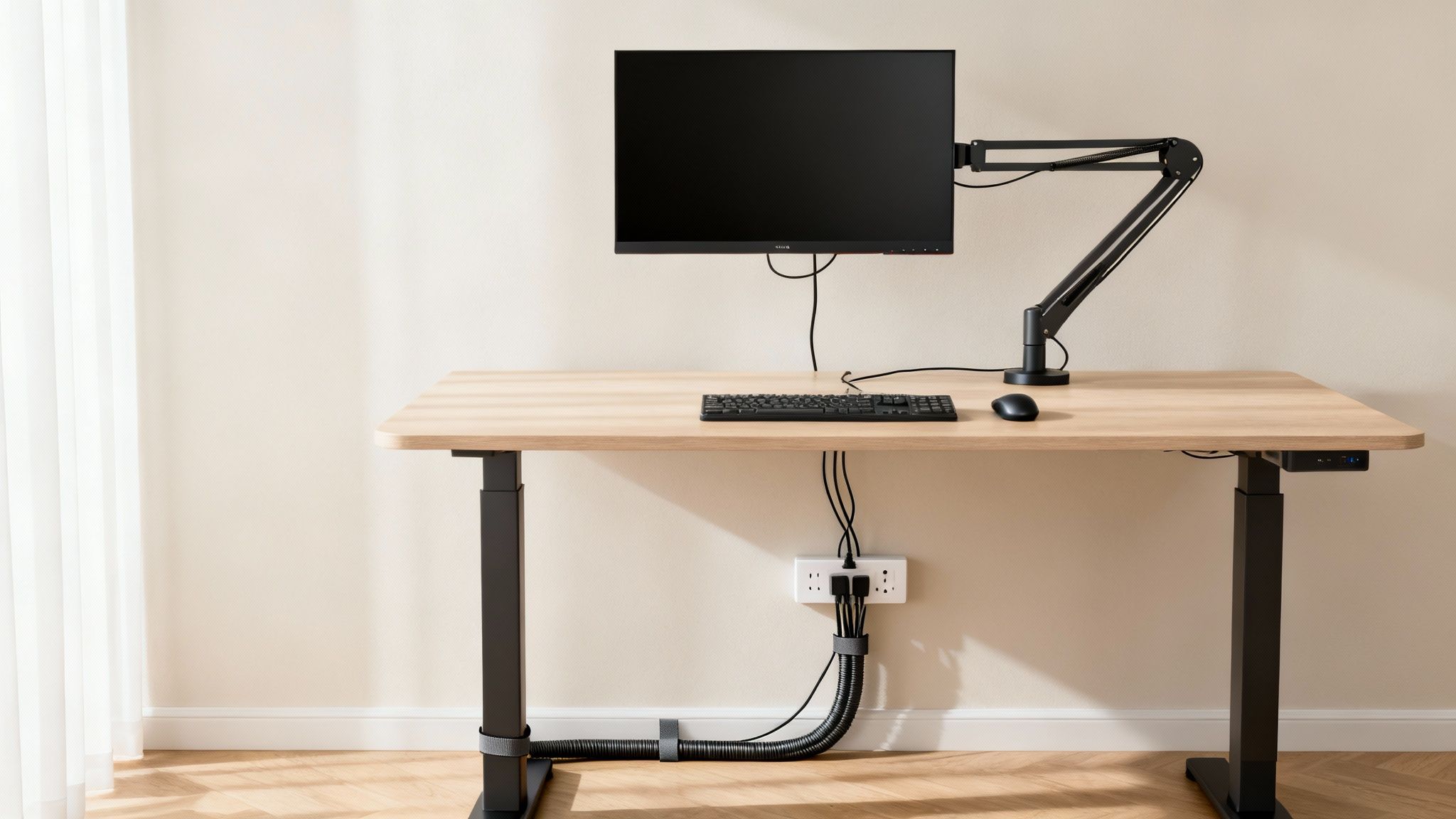
Honestly, the single most impactful move you can make is getting that power strip off the floor. Mounting it to the underside of your desk instantly zaps the main source of cable clutter right at its root. Use some heavy-duty adhesive strips or a dedicated under-desk bracket to secure it near the back edge. It’ll be easy to reach but completely out of sight.
With the power strip mounted, you can finally deal with those bulky power bricks from your laptop or monitor. A great trick is to secure them right next to the power strip using adhesive velcro straps. This keeps their weight supported and stops them from pulling everything else down.
Bundle and Route Your Main Cables
Next up are the usual suspects: your monitor, keyboard, and mouse cables. Instead of letting them run wild, group them together into one, neat bundle. A flexible cable sleeve is your best friend for this job. Just zip or wrap the sleeve around the bundle, and suddenly you have one clean line running from your peripherals to your computer.
This gets even better if you use a monitor arm. You can route that newly sleeved bundle right along the arm itself, using its built-in channels or a few small velcro ties to hold it in place. The result is a clean, "floating" look that makes your whole setup feel more professional.
The goal is to make your cable pathways intentional. Instead of letting gravity dictate where your cords fall, you guide them along the clean lines of your desk and equipment for a professional, deliberate look.
For any leftover wires that need to run along the edge of your desk, an adhesive cable raceway is the perfect finishing touch. These are just simple plastic channels that stick right onto your desk's surface. Tuck the cables inside, snap the cover on top, and they vanish. They're ideal for hiding things like Ethernet cables or power cords discreetly.
For a deeper look at this, check out our complete guide to under-desk cable management for more advanced techniques.
Finally, for the cables you adjust all the time—like chargers or headphones—embrace reusable ties. Velcro straps are fantastic here. They let you make quick adjustments without the hassle of cutting and replacing zip ties, so your organized system stays that way with practically zero effort.
Putting these strategies together will transform your desk from a chaotic workspace into a streamlined and professional command center.
Taming the Entertainment Center Cable Jungle
Your entertainment center should be the relaxing heart of your living room, but let’s be honest—it’s often ground zero for cable chaos. With wires snaking from the TV, soundbar, gaming consoles, and streaming devices, it can quickly look more like a server room than a chill-out zone. Getting that mess under control is the key to creating a truly peaceful, clutter-free space.
First things first, tackle the tangle behind your media console. This is where bulky power strips and awkward adapters create the biggest rat's nest. Instead of letting them sprawl across the floor collecting dust, gather them into a single, discreet container.
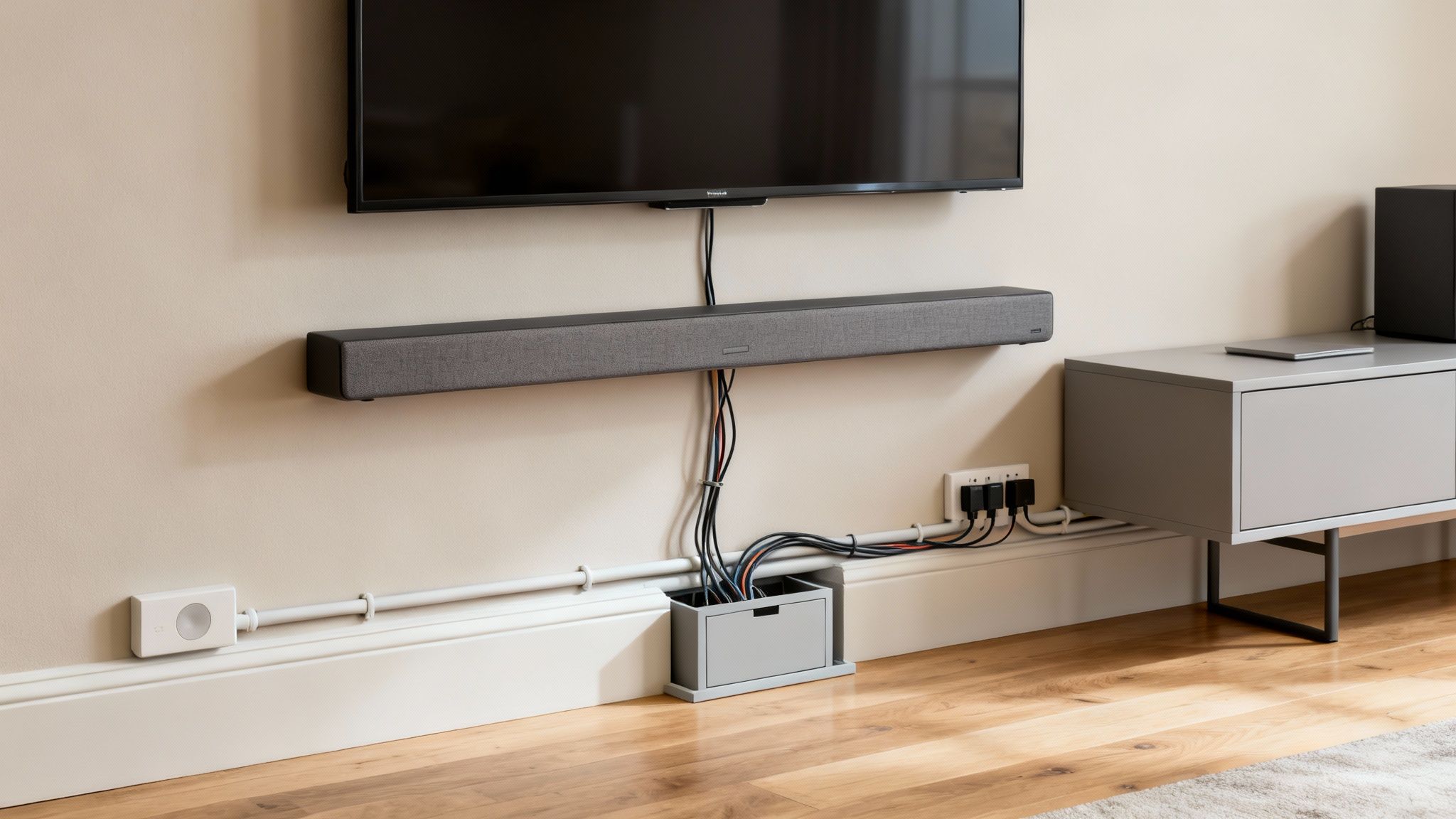
A large-capacity cable management box is your best friend here. It’s designed to swallow an entire surge protector, along with all its chunky plugs, transforming that web of wires into one clean unit that sits neatly behind your furniture. Out of sight, out of mind.
Creating an Invisible Path
Once the power source is contained, the next challenge is dealing with all the signal cables—like HDMI and speaker wires—that connect your devices. Just letting them dangle creates visual noise that pulls your eye away from the screen. The goal is to give these cables a dedicated, invisible pathway along your walls or baseboards.
This is a perfect job for cord hider kits, also known as cable raceways. These are simply adhesive channels that stick right to your wall, letting you run wires neatly from your TV to your speakers or other components without any drilling.
Want to make them truly disappear? Take the extra step and paint the raceways to match your wall color. A quick coat of paint helps the plastic channel blend in so well it looks more like architectural trim than a cable cover. This simple trick is what separates a tidy setup from a professionally installed look.
When you start thinking of cable management as part of your room's design—not just a functional chore—you can achieve that clean, high-end look without calling an electrician.
And you’re not alone in wanting a cleaner setup. The wire and cable management market was valued at a massive USD 20.9 billion in 2024 and is set to grow as more people focus on creating organized and safe homes. You can read the full research on the wire and cable management market to see just how big the trend is.
Handling Wall-Mounted TVs
Wall-mounted TVs look amazing, but they come with one big challenge: how do you hide the cables that drop down from the screen? A single dangling cord can completely ruin that clean, floating aesthetic you were going for.
For this, a combination of tools works best.
- Bundle with a Cable Sleeve: Start with a flexible neoprene cable sleeve. It can wrap all the wires running from your TV into a single, unified column. It’s a huge improvement over seeing four or five individual cords hanging down.
- Conceal in a Vertical Raceway: To take it to the next level, run that bundled cord through a paintable wall raceway. This creates one discreet channel that can be painted to match the wall, making it almost invisible.
If you’re looking for a more detailed walkthrough, our guide on choosing the right TV cable cord cover breaks down the specific steps for getting that perfect, seamless finish. By combining these techniques, you can make sure your entertainment center remains a stylish focal point, completely free from the distraction of wire clutter.
Beyond Aesthetics: The Importance of Safe Cable Management
While a clean, wire-free setup is incredibly satisfying, the best way to hide cables is about so much more than just looking good. It’s really about creating a safer, more functional space for everyone, whether at home or in the office.
When you shift your mindset from "hiding" to "managing" cables, you start to see all the practical benefits—for your family, your pets, and your expensive electronics.
Those tangled cords snaking across the floor are a bigger hazard than most of us realize. They're a classic tripping risk, especially if you have active kids running around or elderly family members who might have mobility challenges. One wrong step can lead to a serious fall or, just as bad, yank a heavy piece of equipment right off a shelf.
Protecting Your Pets and Electronics
Beyond the risk to people, exposed wires are basically a chew toy for curious pets. Cats and dogs, especially puppies and kittens, will often gnaw on anything they can get their paws on. A chewed-through power cord can cause a severe injury to your pet and create electrical shorts that fry your devices.
Tucking those cords away inside a durable housing, like a raceway or a cable box, puts them securely out of reach. It's a simple step, but a crucial part of pet-proofing your home.
Organized cables also directly impact the health of your electronics. When wires are crammed into a chaotic mess behind your desk or TV, they trap a ton of dust and completely block airflow. This can easily cause your devices to overheat, leading to slower performance and a much shorter lifespan.
By managing cables effectively, you’re not just cleaning up; you’re actively investing in the longevity and optimal performance of your valuable technology.
A Growing Focus on Safety and Efficiency
This awareness of safety and functionality isn't just a niche concern—it’s a global trend. The cable management market has grown into a massive industry, valued at around USD 25.38 billion in 2024 and projected to more than double by 2032.
This growth shows that both homeowners and businesses now see organized wiring as a critical part of a modern, efficient space. You can find more insights about the growth of the cable management industry on MordorIntelligence.com.
Taking the time to implement a proper cable management strategy is a responsible choice for any home. If you're looking to create a clean, protected path for wires along your walls, our guide to raceway cable management offers detailed steps and inspiration.
Ultimately, a well-managed space is a safer, more reliable, and far more pleasant place to live and work.
Organizing Cords in Your Car and On The Go
Let's be honest, cable clutter doesn't just stay at home. It’s a persistent problem that follows us right into our cars and travel bags. Taming that mess on the go is key to staying sane and organized when you're away from your perfectly managed home setup. The same ideas apply—bundle, route, and hide—just on a much smaller scale.
In your car, a stray charging cable is more than just ugly; it can be a real distraction. A cord swinging near the gear shift or wrapping around your feet is a genuine safety risk. Thankfully, the fix is ridiculously easy.

A Tidy Dashboard Solution
The secret to a clean car interior is using the dashboard’s own lines and seams to your advantage. A few small, discreet adhesive clips are your best friend here. Just stick them along the underside of the dash or tuck them into the gaps between panels.
This creates a dedicated path for your phone charger or dash cam wire, keeping it secure and out of the way. No more snags, and no more tangled nests in your center console. It's a five-minute job that makes your car feel cleaner every single time you hop in.
For travel, a dedicated tech pouch is non-negotiable. It’s the difference between a backpack full of tangled chargers and a streamlined kit where every accessory has its place.
Conquering Travel Tangles
When you’re on the move, your backpack can quickly turn into that same cable jungle you fought so hard to defeat at home. The answer is to centralize everything into one dedicated tech kit.
This is where a good tech pouch becomes essential. Think of it like a toiletry bag, but for your electronics. It gives you designated loops, pockets, and dividers for all the essentials:
- Your phone's charging cable and wall adapter.
- A portable power bank for when you're nowhere near an outlet.
- Headphones or earbuds, so they don’t get crushed at the bottom of your bag.
- Any extra adapters or dongles you might need.
Having a specific pouch for your tech means you'll never have to frantically dig through your entire bag for a charger again. It keeps your expensive gear protected and completely eliminates the frustration of untangling a knot of wires. It’s a small habit that brings a whole lot of peace of mind to any trip.
Common Cable Management Questions
Even with the best game plan, you're bound to hit a few snags. Let's walk through some of the questions that always seem to come up the moment you decide to tackle that cable mess for good.
How Can I Hide Cables Without Drilling Holes?
This is a big one, especially if you're renting or just don't want to leave permanent marks on your walls. The great news is you have plenty of options that don't require a single power tool.
Your best friend here is an adhesive-backed cable raceway. These are just simple plastic channels that stick right onto your walls, baseboards, or the back of your furniture. You tuck the cables inside, snap the cover on, and you’re left with a finish that looks like it was professionally installed.
Of course, that's not your only option.
- Cable Sleeves: Got a bunch of wires running from a wall-mounted TV or a standing desk? These flexible fabric tubes bundle that multi-colored mess into one clean, single column.
- Adhesive Clips: For those smaller, single wires—think phone chargers or thin speaker cables—these little clips are perfect. Stick them along the back edge of a desk or behind a nightstand to guide cords where no one will ever see them.
- Cable Management Boxes: These are the ultimate "out of sight, out of mind" solution. They’re designed to swallow an entire power strip, bulky plugs and all. Just drop the whole tangled mess inside and run the main cord out the back.
You don't need to be a DIY expert to get a clean look. Modern adhesive solutions are strong, reliable, and completely removable, making damage-free cable management accessible to everyone.
What Is the Best Way to Manage a Power Strip?
Getting that clunky power strip and its web of plugs off the floor is probably the single most satisfying part of cable management. The goal is simple: get it up and out of sight.
The best move is to mount it directly to the underside of your desk or on the back of your TV stand. You can do this with heavy-duty adhesive strips or a bracket designed for the job. Right away, you’ve cleared up floor space and made vacuuming about a thousand times easier.
Once it’s mounted, plug everything in. Next, grab some short velcro ties to bundle the extra slack from each cord into a neat little loop. This stops the dreaded "cable droop" and keeps everything tight. If you want to take it a step further, you can place the entire mounted power strip setup inside a cable management box for total concealment.
Are There Fire Safety Risks with Bundling Cables?
This is a really smart question, and the answer is crucial for peace of mind. Thankfully, for the kinds of cables most of us are dealing with every day, it's generally very safe to bundle them.
Low-voltage cables like HDMI, USB, and Ethernet cords generate next to no heat, so you can group them together without a second thought. The same goes for standard power cords for your everyday electronics like your TV, computer monitor, or gaming console. Bundling them in a sleeve or raceway is perfectly fine.
The big exception? Never bundle or tightly coil heavy-duty power cords for appliances that draw a lot of power—think space heaters, portable AC units, or power tools. You should also avoid coiling up extension cords that are in use, as this can trap heat. Always make sure your cable sleeves or boxes have a little breathing room for air to circulate. Sticking with high-quality, certified products ensures your newly organized space is a safe one, too.
Ready to conquer the cable chaos in your own space? The EVEO store has everything you need, from flexible cable sleeves to complete raceway kits, to create a clean, safe, and professional-looking setup. Explore our solutions and get organized today.
How to Clean a Monitor Screen Safely and Avoid Damage
Best Ways to Hide Cords for a Clean and Tidy Space