

The best way to organize your wires is to create a system—one that groups cables by what they do, shortens their length, and routes them cleanly along surfaces.It’s less about just hiding the mess and more about creating intentional pathways that make your tech easier to use and maintain. With tools like cable raceways and adhesive clips, you can transform that tangled nest into a setup that’s clean, safe, and seriously efficient.
Why Organized Wires Are a Game Changer
Let's be honest, that chaotic jumble of cables behind your desk or TV isn't just an eyesore. It's a silent source of stress and a drag on your efficiency. We’ve all tried stuffing cords behind a plant or a piece of furniture, but that’s just a temporary fix. A real organization strategy can fundamentally improve your space.
A tidy setup isn't just about looking good—it directly impacts your daily productivity, keeps your space safe, and can even help your expensive electronics last longer. This guide is all about building a lasting system that works for you, whether you’re a remote pro managing a complex workstation or a home theater buff aiming for that clean, professional look.
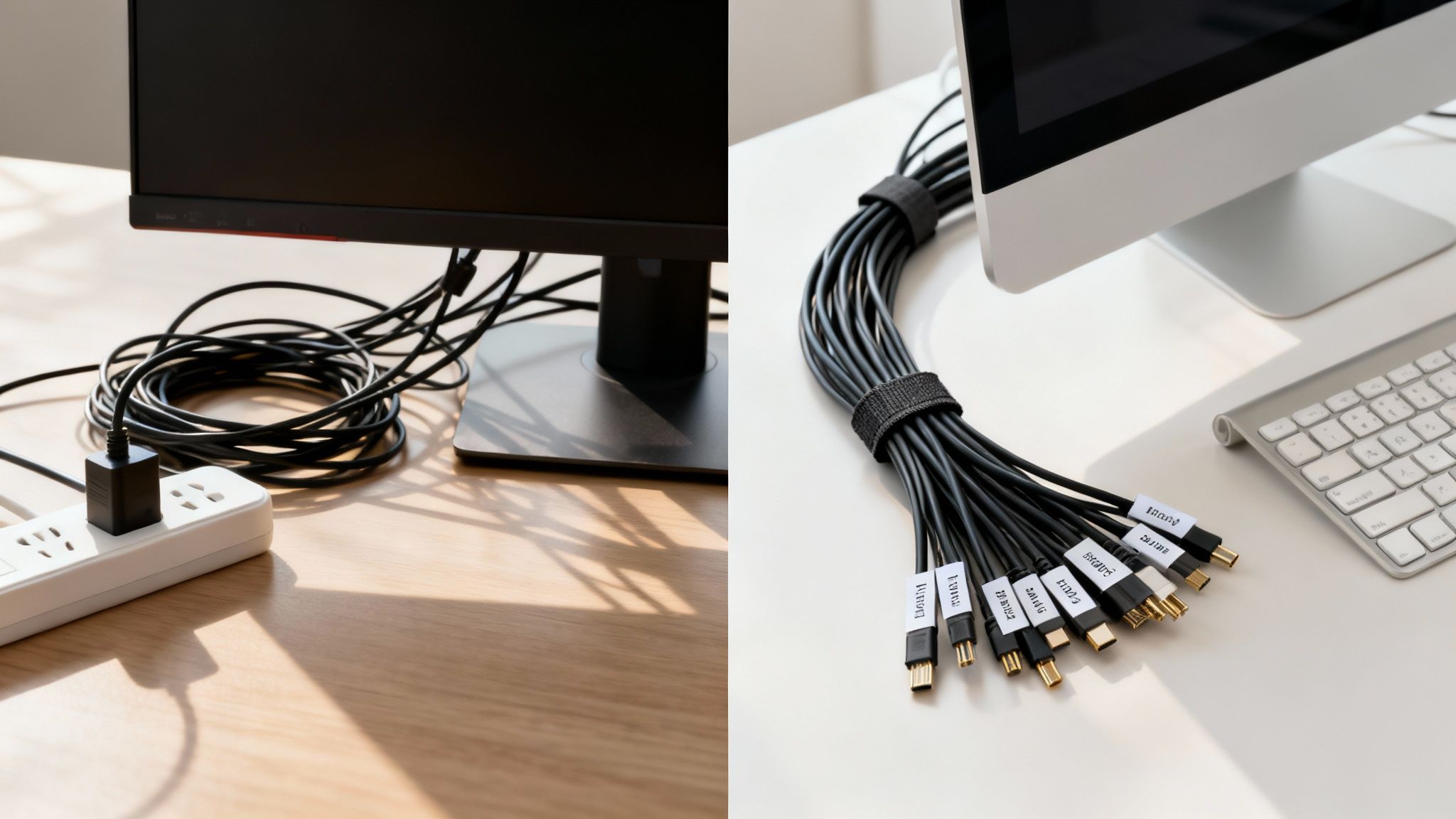
The Hidden Costs of Cable Clutter
Ignoring the cable chaos has real consequences. For one, disorganized wires are a major safety hazard. Ergonomics studies have shown that tangled cords contribute to 15-20% of minor workplace accidents, from trips and falls to yanking expensive equipment right off the desk. This is especially true now that so many of us are working from home with multiple monitors and peripherals.
It's no surprise the global cable management market is projected to grow from USD 25.75 billion in 2025 to USD 52.83 billion by 2034, as highlighted by Fortune Business Insights. People are realizing how important this is.
On top of that, a jumble of wires can actually damage your tech. When power cords are packed tightly together, they generate heat. Without proper airflow, devices like gaming consoles, routers, and computers can overheat, which degrades their performance and shortens their lifespan. Bent, twisted, or pinched cables also suffer from internal damage, leading to spotty connections and, eventually, complete failure.
An organized cable system isn't just a "nice-to-have" detail; it's a foundational element of a functional, safe, and productive environment. It saves you time troubleshooting, protects your investments, and brings a sense of calm to your space.
More Than Just a Tidy Desk
The benefits of a clean setup go beyond the physical and straight into your mental well-being and efficiency. A visually clean workspace minimizes distractions, helping you focus on the task at hand. Instead of wasting time untangling the right charger or tracing a specific cable back to its source, everything is clearly labeled and easy to grab. It’s a simple change that eliminates those small but constant frustrations that break your flow.
Just think about the practical advantages:
- Easier Maintenance and Upgrades: Need to add, remove, or troubleshoot a device? An organized system makes the process painless instead of a 20-minute ordeal.
- Improved Airflow: Giving your electronics room to breathe prevents overheating and performance issues, keeping your gear running smoothly when you need it most.
- Professional Appearance: A clean, organized setup looks great, impresses clients on video calls, and creates a more professional atmosphere for remote work.
Ultimately, mastering the best way to organize wires is about taking control of your environment. It’s about transforming a chaotic space into one that’s truly functional, safe, and just more pleasant to be in.
Building Your Cable Management Toolkit
Before you even think about unplugging a single cord, the first real step toward taming that wire jungle for good is gathering the right tools. This isn't about running out and buying every gadget you see. It's about building a smart, versatile toolkit. Think of it like a chef's knife roll—each tool has a specific job to do to get you that clean, professional-looking result.
The goal is to have options that fit different situations. For example, those single-use plastic zip ties are great for a permanent setup you’ll never touch again, but they’re a huge pain for cables you might need to move later. This is where something like a reusable Velcro tie is a lifesaver, giving you flexibility for your computer desk or charging station where things are always changing.
The Essentials for Taming Wires
For most projects around the house or office, a small, well-chosen collection of supplies will solve 90% of your problems. You don’t need a massive budget—just the right gear.
Here are the absolute must-haves for your kit:
- Velcro Cable Ties: These are the MVPs. They’re infinitely adjustable and reusable, perfect for bundling cables behind your desk or TV—anywhere you might need to get back in there later.
- Adhesive Cable Clips: Small but mighty, these little clips are fantastic for guiding individual cords along the edge of a desk, up a wall, or along a baseboard. They keep wires flat, snug, and out of sight.
- Cable Sleeves or Split Loom Tubing: Got a whole group of wires running the same way (like from your PC to your monitor)? A sleeve bundles them all into one tidy package. Split loom tubing offers more rigid protection, which is great for high-traffic areas where cords might get kicked or bumped.
- A Label Maker or Masking Tape: Trust me on this one. You’ll thank yourself later when you’re not playing the "which plug is this?" guessing game. A simple label on each end of a cord saves an incredible amount of future frustration.
Having these core items on hand means you can tackle cable chaos the moment it starts, instead of letting it become a massive project. A little proactive organization with the right tools is the secret to a system that actually lasts.
Advanced Solutions for a Polished Look
Once you've got the basics down, a few other products can really take your setup to the next level. If you have wires running down a wall from a mounted TV, a cable raceway is your best friend. It’s a clean channel that hides everything completely. For a deep dive on that, check out our ultimate guide to choosing and installing a cable cord hider.
Another pro-level addition is an under-desk cable tray. These mount directly to the bottom of your desk, creating a hidden shelf for your power strip and all that extra cord slack. It gets everything completely off the floor, which not only looks amazing but also makes cleaning a breeze.
Creating a Clutter-Free Workspace
Your desk is the command center for your professional life, and nothing kills productivity faster than a chaotic mess of cables. Figuring out the best way to organize wires in your workspace isn't just about looks; it's about creating a functional, stress-free environment where you can actually focus.
The first, and most important, step is a complete reset.
That’s right—unplug everything. It might feel a little drastic, but you can't really untangle a knotted mess. The only way forward is to rebuild an organized system from the ground up. Once everything is disconnected, lay out all your cables so you can see what you're working with.
This simple workflow is the foundation of any great cable management project: unplug to get a clean slate, bundle cables together to create order, and label everything so you know what's what later on.
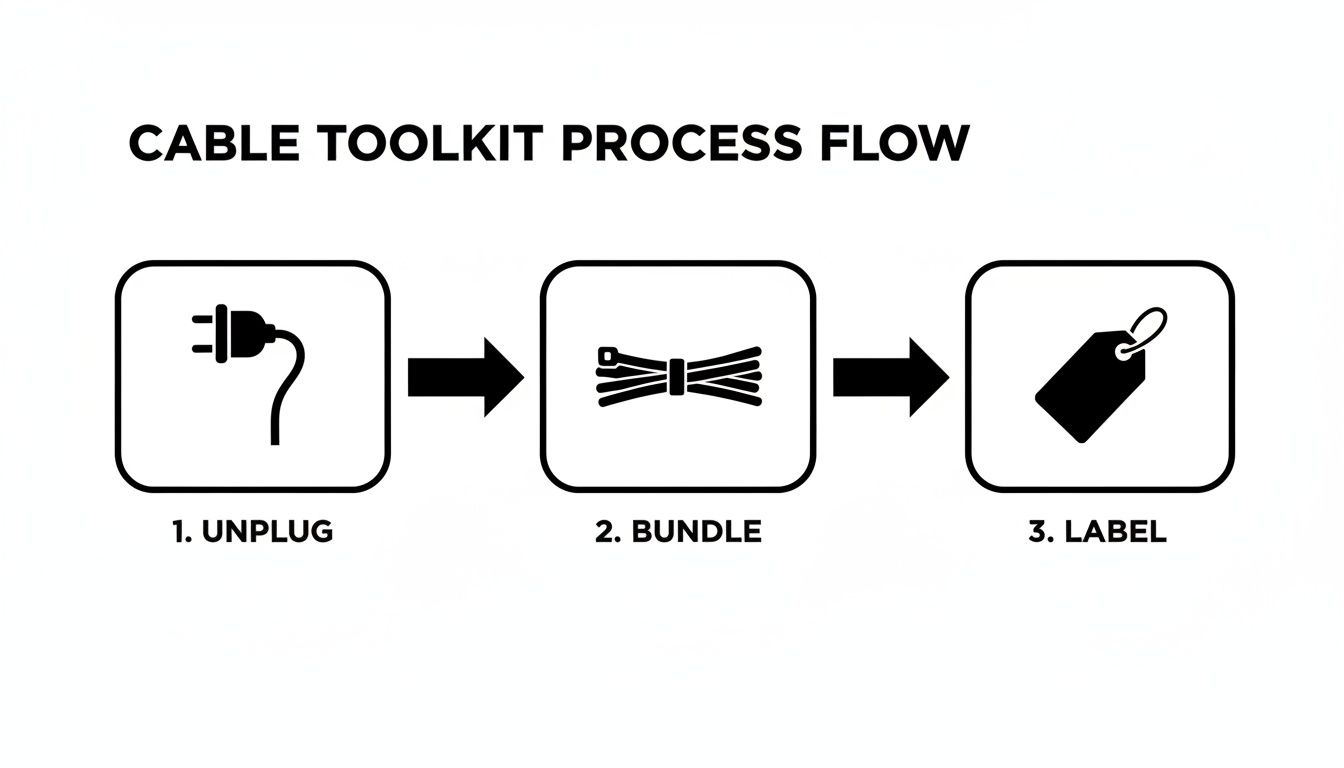
Following this sequence is key. It helps you build a logical, easy-to-maintain system instead of just finding a new way to hide the same old clutter.
Grouping Cables By Function
With everything unplugged, it's time to sort your cables into a few key categories. This simple grouping strategy is the backbone of a clean setup.
- Power Cables: This is everything that plugs into the wall—your monitor, PC or laptop, and maybe a desk lamp. These cables rarely move, so they can be routed and secured more permanently.
- Data Cables: Think HDMI, DisplayPort, and Ethernet cables. They connect your core hardware and are also pretty static.
- Peripheral Cables: This group is for your keyboard, mouse, webcam, and phone charger. These are the cables you might move or swap out, so they need more flexible management.
This isn't just a home office trick; it's a scaled-down version of what happens in huge commercial settings. The industrial cable management market is set to hit USD 31.57 billion by 2031, all driven by the need for efficiency and safety. In manufacturing, where a staggering 40% of downtime is tied to cable faults, organized systems can slash repair costs by 30%. For your desk, that same principle means fewer glitches and more uninterrupted focus. You can find more on these trends from Mordor Intelligence.
Pro-Level Desk Organization Strategies
Once your cables are grouped, it’s time to get clever with routing. Here’s a game-changing tip from seasoned remote workers: mount your power strip to the underside of your desk. This one move gets all those bulky power bricks and extra cord length off the floor, instantly decluttering your foot space and making it a breeze to clean.
The goal is a "zero-on-the-floor" policy. If a cable doesn't absolutely need to touch the ground, it shouldn't. This mindset forces you to find smarter paths along the desk frame, legs, and underside.
Next, make use of your desk's built-in features. A lot of modern desks come with grommet holes designed specifically for routing cables cleanly from the surface to below. If yours doesn't have one, they're surprisingly easy to add. Combine this with some adhesive cable clips to guide wires discreetly along the back edge of your desk, creating pathways that are practically invisible. You can learn more techniques in our guide on under-desk cable management.
Finally, think about upgrading a key component or two. A quality monitor arm does way more than just improve your posture; many come with built-in cable management channels. By lifting your monitor off the desk, you get rid of its bulky stand and can immediately hide its power and data cables right inside the arm itself, creating a clean, floating look.
Taming the Entertainment Center Wire Jungle
The modern entertainment center is a notorious hotspot for cable chaos. With a mix of TVs, soundbars, gaming consoles, and streaming devices all fighting for power and connectivity, it’s easy for the area behind your media console to become a tangled mess. This isn't just an eyesore; it's a functional problem that can hurt performance and even create safety issues.
A great first step is to simply group every cable by its job. Just like you would at a workspace, bundling wires by their purpose—power, audio, and video (like HDMI)—brings immediate order to the chaos. This logical separation makes it so much easier to troubleshoot a connection or swap out a device later without having to unplug everything in sight.
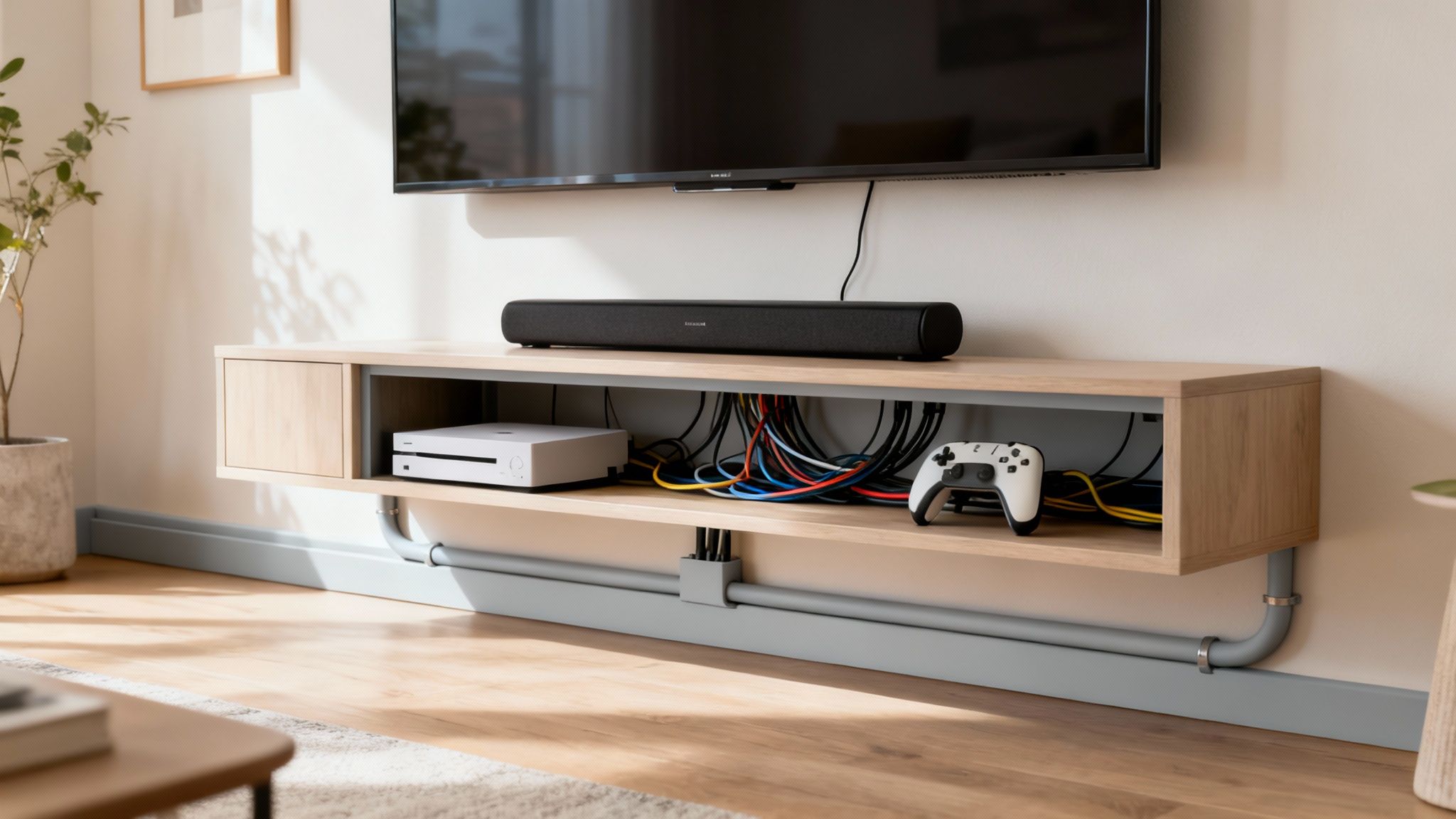
Grab some reusable Velcro ties to bundle each group neatly. This simple trick keeps related cables together and stops them from intertwining with others, laying the foundation for a clean and manageable system.
Hiding Wires for a Floating TV Look
For wall-mounted TVs, those dangling cords are often the biggest eyesore, completely ruining that clean, floating effect you were going for. The absolute best way to handle this is with a cable raceway or cord cover. These are paintable plastic channels that stick right to your wall, letting you run all the cables from the TV down to your console inside a sleek, discreet housing.
This method transforms a jumble of black wires into a single, clean line that can be painted to blend right in with your wall color. It makes a massive difference in achieving a professional, high-end look. For a detailed walkthrough, you can explore our guide on selecting the perfect TV cable and cord cover to match your setup.
A critical, yet often overlooked, part of organizing your entertainment center is airflow. Gaming consoles and AV receivers generate a ton of heat. When wires are tightly packed and disorganized, they can trap this heat, leading to device overheating, performance throttling, and a shorter lifespan for your expensive electronics.
To make the best choice for your living room, it helps to compare the most common concealment methods side-by-side.
Choosing Your Cable Concealment Method
| Method | Best For | Difficulty | Aesthetic |
|---|---|---|---|
| Cable Raceways | Hiding vertical cable drops from wall-mounted TVs. | Easy | Clean and paintable, but visibly covers the wall surface. |
| In-Wall Kits | Achieving a completely invisible, professional look. | Moderate to Hard | The cleanest possible look, with no visible cords. |
| Cable Sleeves | Bundling multiple cords running from a console to a power strip. | Easy | Flexible and tidy, but the bundle itself remains visible. |
| Under-Desk Trays | Managing power strips and excess cable slack behind a media unit. | Easy | Hides clutter completely from the front view. |
While in-wall solutions offer a flawless look, a high-quality raceway or a simple cable sleeve can deliver fantastic results with far less effort.
Promoting Airflow and Protecting Your Gear
Making sure your electronics can breathe is just as important as hiding the cables. The good news is, an organized system naturally improves ventilation.
Here are a few actionable tips to keep things cool and tidy:
- Create Space: When you bundle cables behind your console, leave a few inches of space between the bundles and the back of your devices. This allows air to circulate freely around the vents.
- Use Cable Trays: An adhesive or screw-in cable tray mounted to the back of your media console lifts power strips and excess wiring off the floor or shelf, seriously improving airflow underneath.
- Route Behind Furniture: Instead of letting cables pool on the floor, use adhesive clips to guide them along the back edges or legs of your entertainment unit. An EVEO cable management kit provides all the essential clips and ties to make this process simple and effective.
By combining smart bundling with concealment tools like raceways, you can completely conquer the wire jungle. This approach not only makes your living space look better but also protects your valuable tech by keeping it cool, safe, and running at its best.
Organizing Cords for Travel and Your Car
A clean setup isn't just a luxury for your desk; it's an absolute game-changer when you're on the move. Whether you're commuting or flying across the country, managing your cables is the secret to convenience and safety, making sure you can always find the right charger without that frantic, frustrating search.
Let's be honest, we've all been there: a backpack filled with a tangled mess of headphones, charging bricks, and USB cords. That constant pulling and knotting doesn't just waste your time—it actively destroys your gear. In fact, studies show that disorganized wires lead to 22% more device damage, while a little bit of organization can extend a cable's lifespan by as much as 50%.
Keeping Your Tech Bag Tangle-Free
The real secret to a neat travel bag is giving every single cable its own dedicated home. Don’t just toss them in and hope for the best. Instead, grab some small, reusable Velcro ties and coil each cord individually. This simple habit is the number one way to prevent them from turning into one massive, infuriating knot.
For an even cleaner system, I swear by a small electronics organizer pouch. Most of them have built-in elastic loops and zippered pockets designed specifically for this.
- Coil, Don't Fold: Always, always loosely coil your cables in a circle. Folding them at sharp angles creates weak points and eventually breaks the delicate wires inside.
- Use a Dedicated Pouch: A small tech dopp kit keeps all your chargers, adapters, and cables in one spot. No more digging through your entire bag just to find a power bank.
- Embrace Short Cables: Whenever you can, buy shorter cables (think 1-foot or 3-foot versions) just for your travel kit. It's the easiest way to cut down on excess length and bulk.
Keeping on-the-go tech organized is no longer a niche habit for a few neat freaks. As travelers demand seamless connectivity, the global market for cable management accessories is projected to grow from USD 960 million in 2025 to USD 1,371 million by 2031. You can find more insights about this growing market from Infinity Market Research.
Streamlining Your Car’s Cable Setup
Inside your car, loose wires for a dash cam or phone charger aren't just messy—they're a genuine safety hazard. A dangling cord can easily get snagged on your gear shifter or tangle around your feet, creating a dangerous distraction.
The solution is to route them discreetly along the natural seams and edges of your car’s interior. Plug in your device, then trace the cleanest path to the power source—usually the 12V outlet or a USB port. From there, use small, transparent adhesive clips to secure the wire along the edge of the dashboard, down the side of the center console, or tucked neatly under the trim.
An EVEO cable management kit is perfect for this, since it comes with a variety of clip sizes that hold wires securely without looking bulky or out of place. This simple routing trick keeps your essential cables accessible but completely out of your way, ensuring a safer and much more organized drive.
Your Cable Organization Questions Answered
Even with the best plan, you're bound to hit a snag or two during a big organization project. Think of this as your go-to guide for those last-minute questions that always seem to pop up right when you're in the middle of wrangling wires.
How Should I Label My Cables?
This is one of the most common questions, and for good reason. It seems like a tiny detail, but it’s a massive time-saver down the road. You want to be 100% certain you’re unplugging the right thing before you accidentally kill the power to your main hard drive.
A piece of masking tape and a marker works if you're in a bind, but it’s a temporary fix that will likely peel off or smudge. For something that lasts, a dedicated label maker is great, or you can find pre-printed labels that wrap securely around the wire.
Here’s a pro tip that makes a huge difference: label both ends of every single cable. That way, you know what you're looking at from behind your computer just as easily as you do down at the power strip.
What's the Best Way to Handle Thick, Stiff Cables?
We’ve all been there. You’ve got a thick, heavy-duty power cord or an older HDMI cable that just refuses to cooperate. It has a "memory" from being coiled in its packaging, and it creates tension and messes up your otherwise clean layout. Whatever you do, don't force it into a sharp bend—that’s a surefire way to damage the delicate wiring inside.
The trick is to work with the cable, not against it.
- Go for Gentle Sweeps: Instead of fighting for a tight 90-degree turn, route the cable in a wider, more gradual arc. This takes the strain off the internal connections.
- Bring in Bigger Clips: Those small adhesive clips probably won't cut it. You’ll want larger, sturdier clips or even a J-channel raceway that gives a beefy cable more room to breathe.
- Use Velcro for Coils: If you have extra length, don't just stuff it behind the desk. Loosely coil it and secure it with a Velcro tie. The key word here is loosely. A gentle loop is all you need to keep things tidy without stressing the cable.
The golden rule of wire organization is to avoid creating tension. A well-managed cable should always have a little slack and follow a natural, clear path. It doesn't just look better; it dramatically extends the life of your gear.
Can I Bundle Power and Data Cables Together?
This is the big one. Is it okay to run your power cords and your data cables (like HDMI, Ethernet, or USB) together in the same sleeve or raceway?
The short answer is no, you should really avoid it whenever you can.
Power cables, especially those for high-draw devices like monitors or PCs, can create an electromagnetic field. When your data cables are running right alongside them, that interference can mess with the signal. You might see it as a fuzzy monitor display, slower-than-usual internet speeds, or even some crackling in your audio.
For the best, most reliable performance, try to keep a bit of space between your power and data lines. If they absolutely have to cross paths, have them intersect at a 90-degree angle instead of running parallel to each other. It’s a simple move that protects both your equipment and your signal quality.
At EVEO, we believe a clean space is a more productive and enjoyable one. From our ergonomic monitor arms with built-in cable channels to our complete management kits, we have what you need to build a setup that’s as functional as it is beautiful. Explore our solutions at https://eveo.store and take the first step toward a clutter-free environment.
How to Clean Computer Screens Without Causing Damage
How to Clean Your Monitor Screen Without Streaks or Scratches